
CRAPS ROYALE
Developed by TheVegasLab.com · JAXBIRD LLC
Learn craps. Test strategies. Understand the math.
Craps Royale is the most detailed craps simulator ever made — built for players who want to actually understand the game, not just click buttons and watch chips disappear.
Every bet on a real casino table is here. All 42+ bet types, 3 game variants, real stickman voice calls, configurable odds and payouts, and a complete session log you can export to Excel. The rules, the payouts, the probabilities — all identical to a physical casino craps table.
What no casino gives you is the Dice Lab. Force any roll. Bias the probability. Simulate hot and cold table streaks. See exactly which bets win or lose on any possible outcome before you roll. Think of it as a craps table with an X-ray machine attached — same game, but now you can see through the math.
Whether you're a first-timer learning what a Pass Line is, or an experienced player testing a Martingale system over 500 rolls with exported data — this is the tool built for you.
⚡ Quick Start — Your First Roll in 60 Seconds
- Enter the table — On the setup screen, leave everything at default and tap "ENTER TABLE".
- Pick a chip — Tap any denomination in the chip rack at the bottom (try $5).
- Place a Pass Line bet — Tap the PASS LINE zone on the table. Your chip appears on it.
- Roll the dice — Tap the ROLL button (or press Space).
- See what happens — Rolled 7 or 11? You win. 2, 3, or 12? You lose. Anything else sets a "point" — keep rolling until that number hits again (win) or a 7 comes up (lose).
To remove a chip: right-click (desktop) or long-press (mobile). That's it — you're playing craps. Explore the rest of this manual when you're ready for advanced bets and strategies.
🎲 What is Craps?
Craps is a casino dice game. One player — the shooter — throws two dice, and everyone at the table bets on the outcome. The most common bet is the Pass Line: you're betting that the shooter will win.
The game has two phases:
- Come-out roll — The shooter's first throw. A 7 or 11 wins instantly. A 2, 3, or 12 ("craps") loses instantly. Any other number (4, 5, 6, 8, 9, or 10) becomes the point.
- Point phase — The shooter keeps rolling. If the point hits again, Pass Line wins. If a 7 comes up first ("seven out"), Pass Line loses and the dice pass to the next shooter.
That's the core of craps — everything else (Place bets, Odds, Hardways, propositions) are side bets built around this cycle. This simulator includes all 42+ of them, explained in detail throughout this manual.
1. Getting Started
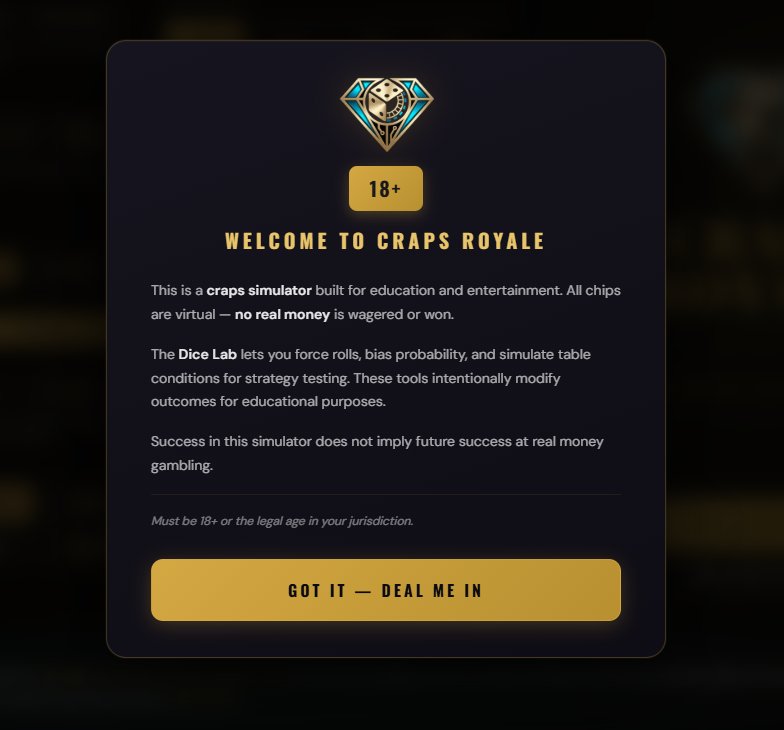
When you launch Craps Royale for the first time, you'll see a welcome screen confirming this is a simulator for education and entertainment — no real money is involved. Tap "GOT IT — DEAL ME IN" to continue. This screen only appears once per device.
The Setup Screen
The setup screen is where you configure your game before stepping up to the table.
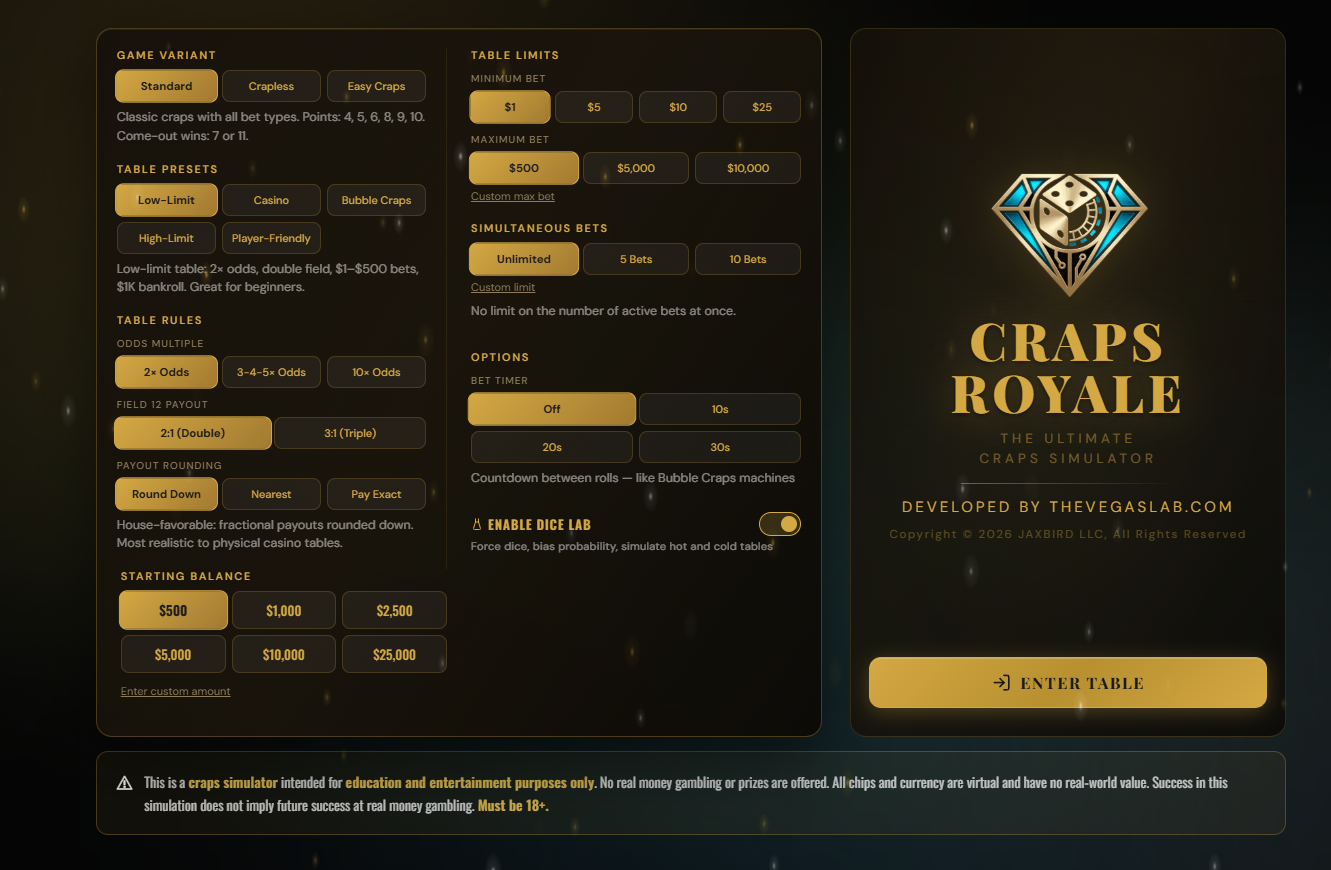
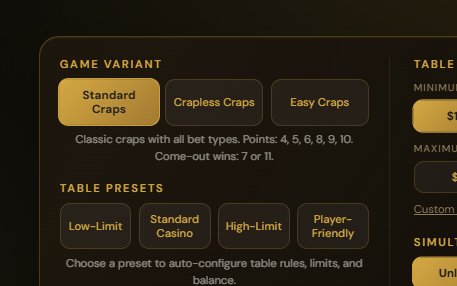
Game Variant
Choose between Standard Craps, Crapless Craps, or Easy Craps. Each variant is a completely different game with its own table layout, rules, and available bets. See Section 7: Game Variants for full details.
Table Presets
Presets configure everything in one click — odds mode, field 12 payout, bet limits, and starting balance. Pick one as a starting point, then fine-tune any individual setting:
| Preset | Best For | Key Settings |
|---|---|---|
| Low-Limit | Beginners, learning the game | 2× odds, double field, $1–$500 bets, $1,000 bankroll |
| Casino | Realistic Vegas experience | 3-4-5× odds, double field, $10–$5,000 bets, $5,000 bankroll |
| Bubble Craps | Electronic table experience | 3-4-5× odds, double field, exact payouts, $1–$500 bets, $500 bankroll, bet timer enabled |
| High-Limit | Serious players, big swings | 10× odds, triple field, $25–$10,000 bets, $25,000 bankroll |
| Player-Friendly | Maximum fun, lowest house edge | 10× odds, triple field, exact payouts, no bet limits, $1–$10,000 bets, $5,000 bankroll |
Fine-Tuning Individual Settings
After selecting a preset, you can override any individual setting:
Odds Mode — 2×, 3-4-5×, or 10×. Controls how much you can bet behind a line bet.
Field 12 Payout — Double (2:1) or Triple (3:1). Affects the Field bet house edge.
Payout Rounding — Round Down, Nearest, or Pay Exact. See Section 8 for details.
Max Bet — Maximum wager per bet zone. Choose from preset amounts or enter a custom value.
Simultaneous Bets — Limit how many bets you can have active at once (5, 10, or unlimited). Useful for beginners who want to avoid spreading too thin.
Bet Timer — Enable a countdown timer between rolls, simulating the pace of a Bubble Craps machine or a live table. Choose Off, 10s, 20s, or 30s. When the timer expires, a "No More Bets" announcement plays and the dice roll automatically. The timer pauses while modals (Settings, Stats, Exit) are open.
Custom Amounts
For Max Bet, Simultaneous Bets, and Starting Balance, you can enter custom values instead of using the preset buttons. Tap the "Custom max bet", "Custom limit", or "Enter custom amount" link below each setting. A text field appears where you type your desired amount and confirm with the checkmark (✓). The link updates to show your custom value. To clear a custom value, tap the ✕ button.
Starting Balance
Pick from preset amounts ($500, $1,000, $5,000, $10,000, $25,000, $50,000, $100,000) or enter any custom amount. This is your starting bankroll for the session.
Dice Lab Toggle
At the bottom of the setup screen, you can enable or disable the Dice Lab simulation tools before entering the table. You can also toggle this from Settings at any time during play.
Once you're happy with your configuration, tap "ENTER TABLE" to begin.
Bubble Craps Mode
The Bubble Craps preset simulates the electronic craps machines found in many casinos. It enables the Bet Timer — a countdown bar at the bottom of the screen that gives you a fixed window to place your bets before the dice roll automatically. When the countdown reaches the final second, a "No More Bets" announcement plays, bet zones lock, and the dice roll. This creates the same pacing pressure as a real Bubble Craps machine.
You can enable the bet timer with any preset by selecting a timer duration (10s, 20s, or 30s) in the setup screen or from Settings during play. Set it to Off to return to manual rolling.
Auto-Save & Resuming Your Game
Craps Royale automatically saves your game after every roll. If you close the browser tab, shut down the app, or your device loses power, your entire session is preserved — balance, bets on the table, statistics, session log, and all settings. When you reopen the game, it picks up exactly where you left off. No need to save manually.
The only way to reset your game is to explicitly choose "EXIT TO MAIN MENU" from the exit panel (accessible via the exit icon in the top-right area of the table). This clears your saved state and returns you to the setup screen, where you can configure a fresh session. Closing the app or browser does not reset your game — only the exit button does.
Out of Chips
If your balance reaches zero with no bets remaining on the table, an "Out of Chips" overlay appears with three options:
Add More Chips — Tops up your balance with the same amount you started with, without resetting your session. Your stats, roll history, and session log continue as-is. This lets you keep playing and studying the same session.
View Stats — Opens the Statistics Dashboard so you can review your session performance before deciding what to do next.
Exit to Main Menu — Returns to the setup screen where you can start a fresh session with new settings.
Since all chips are virtual, running out is just a learning moment — add more and keep going.
2. Platform Availability
Craps Royale runs on three platforms. The core game is identical everywhere, but some features are platform-specific:
| Feature | Desktop (Steam) | Browser (TheVegasLab.com) | Mobile Browser |
|---|---|---|---|
| Full game & all bet types | ✓ | ✓ | ✓ |
| Dice Lab | ✓ | ✓ | ✓ |
| Session Log & CSV Export | ✓ | ✓ | ✓ |
| Steam Achievements | ✓ | — | — |
Desktop — Steam Version
The Steam version runs as a native desktop application through WebForge Shell (Windows 64-bit). It includes Steam Achievements (16 achievements — see Section 15) and Steam Stats tracking. The fullscreen button in the top bar toggles native fullscreen mode. Achievements are only available in this version. Your game is saved locally and automatically restored when you relaunch.
Browser — TheVegasLab.com
The web version at TheVegasLab.com runs in any modern browser. It includes a Fullscreen button in the top-right corner of the table that uses the browser's native fullscreen API. Your game is saved to the browser's local storage — clearing browser data will reset your progress.
Mobile Browser
The mobile version works in Safari (iOS) and Chrome (Android). The table is designed to fit on smaller screens, with some unique features:
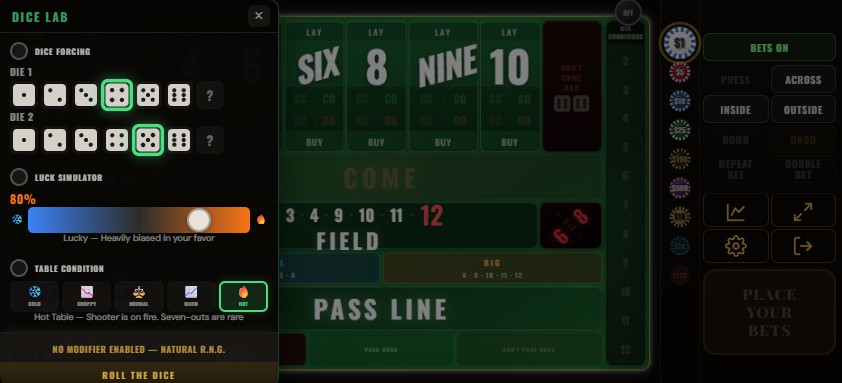
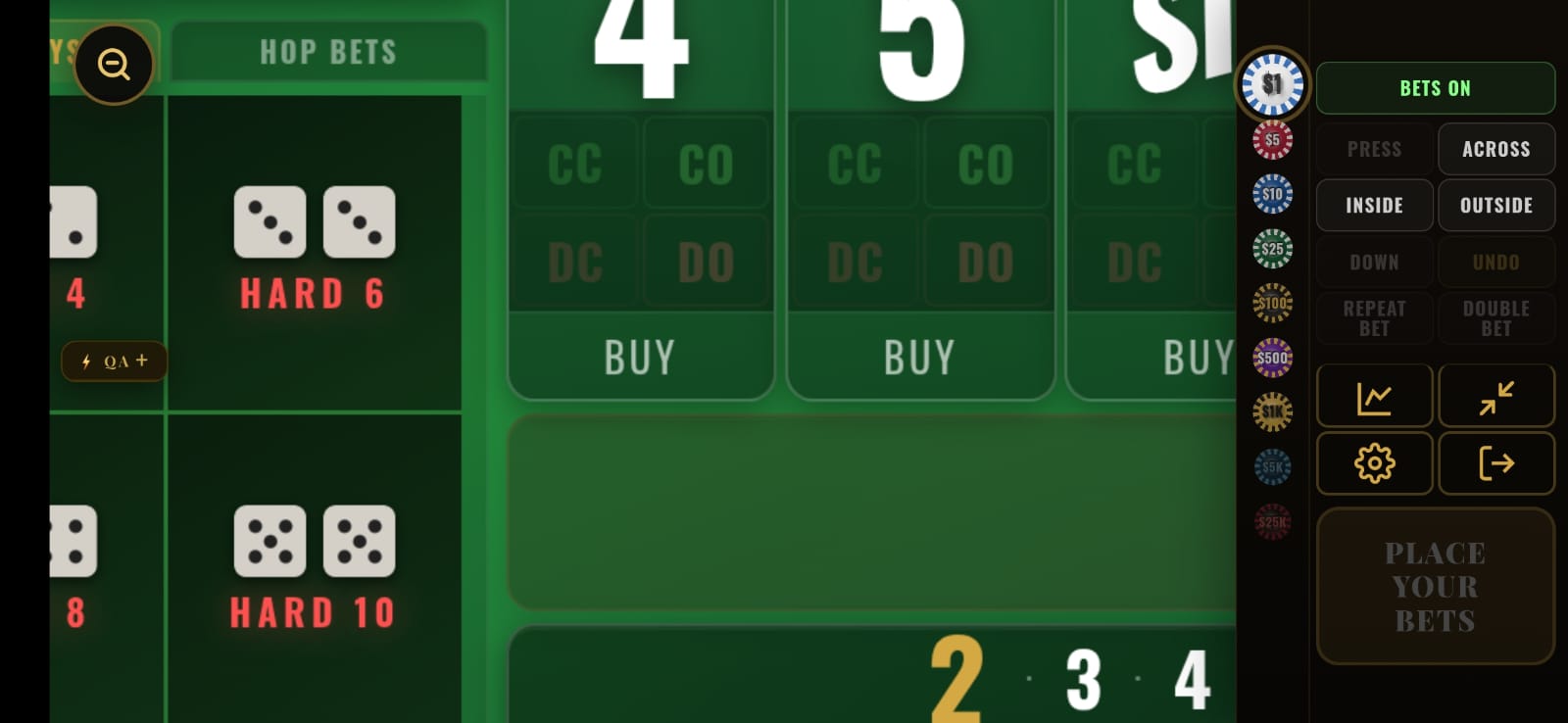
Dice Lab Side Tab — On mobile, a golden half-circle tab appears on the left edge of the screen when the Dice Lab is enabled. Tap it to open the Dice Lab panel as a floating overlay. This replaces the bottom-bar Dice Lab button used on desktop.
Pinch-to-Zoom — Enable this from Settings to zoom into specific areas of the table. Use two fingers to pinch-zoom and drag to pan. Double-tap anywhere to reset the view. When you're zoomed in, a Reset Zoom button appears on screen — tap it to instantly snap back to the full table view.
3. The Craps Table
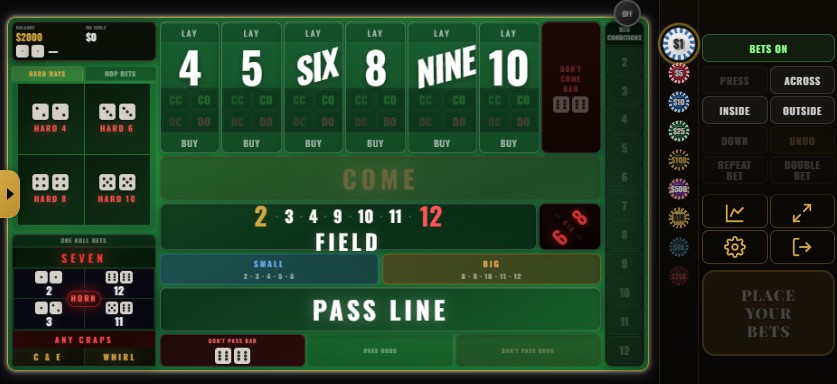
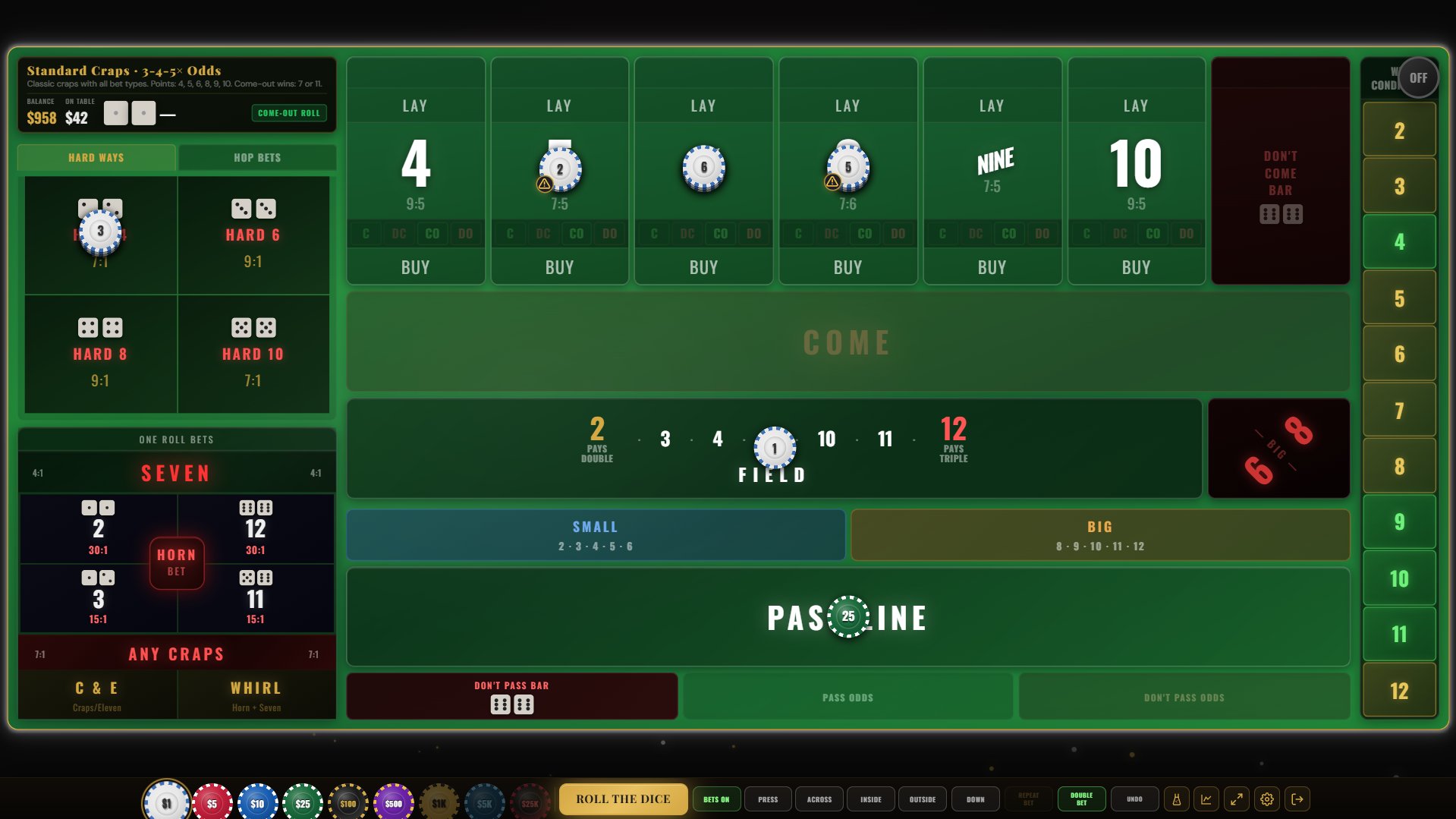
The table layout mirrors a real casino craps table with all betting zones clearly labeled.
Top Bar
Balance — Your current chip total, always visible.
On Table — How much you currently have wagered across all bets.
Game Phase — Shows "COME-OUT ROLL" or "POINT IS [number]".
Roll History — A strip showing the last 12 dice results. Tap to expand and see the last 16 with individual die faces and totals.
The Table Felt
The green felt is divided into betting zones. Each zone is a place where you can put chips. Zones light up when you hover over them (or long-press on mobile) and show detailed tooltips explaining the bet, the payout, and the house edge.
The Puck
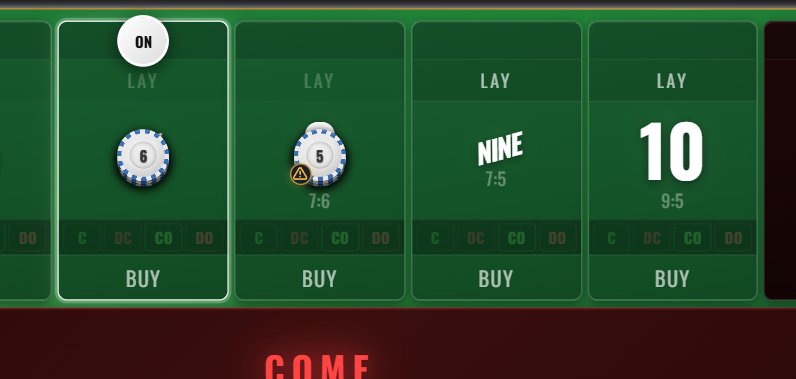
The black-and-white puck indicates the game phase:
OFF (black side up) — Come-out roll. The shooter is establishing a point.
ON (white side up, sitting on a number) — Point phase. The shooter is trying to hit that number before rolling a 7.
Bottom Bar
The bottom bar is your control center. On desktop, the controls are spread horizontally across the bottom of the screen. On mobile, the same controls are arranged in a compact layout.

Chip Rack — Nine denominations from $1 to $25,000. Tap to select, then tap a bet zone to place.
ROLL THE DICE — The main action button. When a Dice Lab simulation mode is active, the button shows "SIM MODE" — a clear visual reminder that the dice are being influenced by Dice Lab settings and the outcome may not be natural random.
Quick Actions — Press, Across, Inside, Outside, Down, Repeat Bet, Double Bet, and Undo.
Bets On/Off — Toggle working bets during point phase.
Icons — Dice Lab and Settings buttons on the right side.
4. How Craps Works
If you're new to craps, here's the basic flow:
Come-Out Roll
Every round starts with a come-out roll. The puck shows OFF.
Roll a 7 or 11 (a "natural") → Pass Line wins immediately. New come-out roll.
Roll a 2, 3, or 12 (called "craps") → Pass Line loses immediately. New come-out roll.
Roll a 4, 5, 6, 8, 9, or 10 → That number becomes the Point. The puck flips to ON and moves to that number.
Point Phase
Now the shooter keeps rolling, trying to hit the Point before rolling a 7.
Roll the Point number → Pass Line wins! The puck goes back to OFF. New come-out roll.
Roll a 7 → "Seven out." Pass Line loses. Most bets on the table are swept. New round.
Roll anything else → The round continues. Other bets may resolve (Field, propositions, Hardways, hop bets), but the Pass Line waits.
5. Placing Bets
Selecting a Chip
Tap a chip denomination in the chip rack at the bottom of the screen. The selected chip glows. Available denominations:
| Chip | Color |
|---|---|
| $1 | White |
| $5 | Red |
| $10 | Blue |
| $25 | Green |
| $100 | Black |
| $500 | Purple |
| $1,000 | Gold |
| $5,000 | Dark Blue |
| $25,000 | Black/Red |
Chips you can't afford are dimmed and unselectable.

Placing & Removing Bets
With a chip selected, tap any valid betting zone. Your chip appears on that zone. Tap again to add another chip of the same denomination.
Removing chips:
Right-click (or long-press on mobile) to remove chips one at a time.
Shift + Right-click to remove all chips from a zone at once (desktop).
Shift + Click to double an existing bet on a zone (desktop).
Some bets are contract bets (Pass Line, Don't Pass, Come, Don't Come) and cannot be removed once a point is established — just like in a real casino.
Quick Actions
The bottom bar includes quick-action buttons that real craps players use:
Bets On/Off — Toggle working bets on or off during point phase.
Press — Double a winning Place bet after it pays out.
Across — Place all point numbers except the current point in one tap.
Inside — Place 5, 6, 8, 9 (the "inside" numbers).
Outside — Place 4, 5, 9, 10 (the "outside" numbers).
Down — Take down all retractable bets from the table.
Repeat Bet — Replay the exact bet layout you had on the previous roll. Useful when you want to keep the same strategy going without re-placing each bet individually.
Double Bet — Double all your active bets at once. Contract bets that can't be modified (like a Pass Line bet with a point established) are skipped. If you don't have enough balance to double everything, the action is cancelled.
Undo — Reverse the last bet you placed.
Bets On / Bets Off
The Bets On / Bets Off button toggles whether your multi-roll bets are "working" (active) on the next roll. When you turn bets off, those bets stay on the table but don't resolve — they can't win or lose until you turn them back on.
The button changes color to show the current state: green "BETS ON" when bets are working, red "BETS OFF" when paused. Affected bet zones are visually dimmed on the table so you can see at a glance which bets are sleeping.
Bets affected by On/Off:
Place bets, Buy bets, Lay bets, Hardway bets, Come/Don't Come Odds, Big 6/8, and Big/Small.
Bets NOT affected (always working):
Pass Line, Don't Pass (base bets), Pass/Don't Pass Odds, Come, Don't Come (base bets), Field, and all single-roll proposition bets (Any 7, Any Craps, Aces, Yo, Boxcars, Horn, C&E, Whirl, and Hop bets).
6. All Bet Types Explained
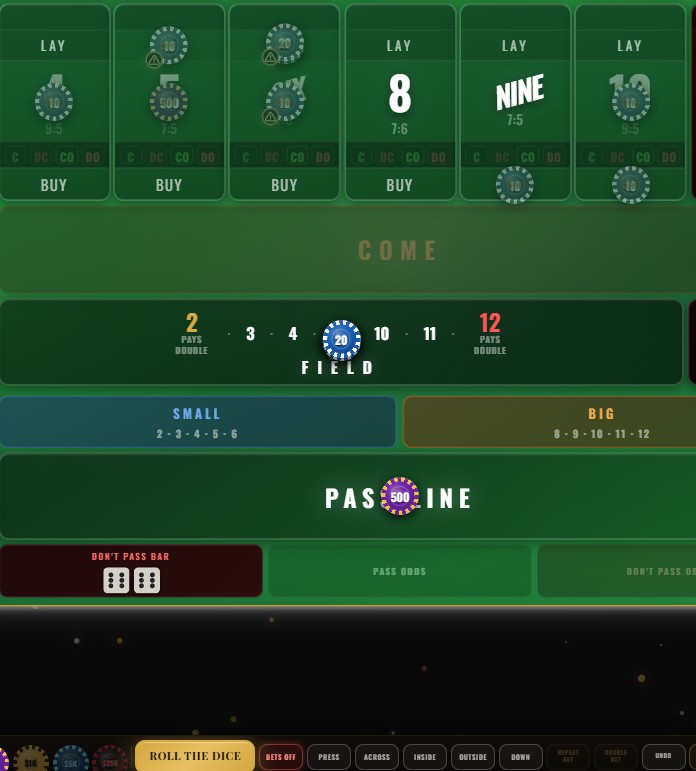
Craps Royale includes every bet found on a real craps table — 42+ types in total. Here's what each one does.
Bet Categories
Every craps bet falls into one of three categories:
Contract Bets — Once a point is established, these bets are locked in. They cannot be removed, reduced, or increased until they resolve. A lock icon appears on the chip. Pass Line and Come are contract bets.
Multi-Roll Bets — These stay on the table across multiple rolls until a specific outcome resolves them. Place, Buy, Lay, Hardways, Odds, Big 6/8, and Big/Small are multi-roll bets. Most can be taken down at any time.
Single-Roll Bets — These resolve on the very next roll. Win or lose, they're done. Field, all Propositions, Horn, C&E, Whirl, and Hop bets are single-roll.
Mutually Exclusive Bets
Just like in a real casino, certain bets cannot coexist on the table:
Pass Line ↔ Don't Pass — You cannot bet on both at the same time. You're either with the shooter or against them.
Come ↔ Don't Come — Same rule. Choose one side per roll.
Buy/Place ↔ Lay on the same number — You can't bet that a number will hit AND that a 7 will come before it. Pick one.
Bet Availability by Variant
Not every bet is available in every variant. This table shows which bets exist in each game:
| Bet Type | Standard | Crapless | Easy |
|---|---|---|---|
| Pass Line / Pass Odds | ✓ | ✓ | ✓ |
| Don't Pass / Don't Pass Odds | ✓ | — | — |
| Come / Come Odds | ✓ | ✓ | — |
| Don't Come / Don't Come Odds | ✓ | — | — |
| Place Bets | ✓ | ✓ | ✓ |
| Buy Bets | ✓ | ✓ | — |
| Lay Bets | ✓ | — | — |
| Hardways | ✓ | ✓ | ✓ |
| Field | ✓ | ✓ | ✓ |
| Low Field / High Field | — | — | ✓ |
| Big 6 / Big 8 | ✓ | — | — |
| Big / Small | ✓ | — | — |
| Propositions (Any 7, Craps, Aces, Yo, etc.) | ✓ | ✓ | ✓ |
| Horn / C&E / Whirl | ✓ | ✓ | ✓ |
| Hop Bets (all 21) | ✓ | ✓ | ✓ |
Line Bets (Contract Bets)
Pass Line — The most fundamental craps bet. Cannot be removed once a point is established (contract bet). Pays even money (1:1).
| Roll | Condition | Standard | Crapless | Easy |
|---|---|---|---|---|
| Come-out | Win | 7 or 11 | 7 | 7 |
| Lose | 2, 3, or 12 | — | — | |
| Point set | 4, 5, 6, 8, 9, 10 | 2, 3, 4, 5, 6, 8, 9, 10, 11, 12 | ||
| Point phase | Win | Point is rolled again | ||
| Lose | 7-out | |||
Don't Pass — The opposite of Pass Line. Wins when the shooter loses. Pushes on 12 (the "bar") during come-out — the casino won't let you have a guaranteed win. Known as "betting against the shooter" or playing the "dark side." Not available in Crapless or Easy variants.
| Roll | Condition | Standard | Crapless | Easy |
|---|---|---|---|---|
| Come-out | Win | 2 or 3 | Not available | |
| Push | 12 (bar) | |||
| Lose | 7 or 11 | |||
| Point set | 4, 5, 6, 8, 9, 10 | |||
| Point phase | Win | 7-out | Not available | |
| Lose | Point is rolled again | |||
Odds Bets
Pass Line Odds — After a point is established, place an additional bet "behind" your Pass Line. This pays at true odds with zero house edge — the single best bet in any casino. The maximum you can bet depends on your table's odds mode (2×, 3-4-5×, or 10×).
| Point | True Odds Payout | Ways to Roll |
|---|---|---|
| 4 or 10 | 2 to 1 | 3 ways (hardest) |
| 5 or 9 | 3 to 2 | 4 ways |
| 6 or 8 | 6 to 5 | 5 ways (easiest) |
Don't Pass Odds (Lay Odds) — Place odds against the point. Payouts are inverted: you risk more to win less, because the 7 is more likely than any single point number.
| Point | Don't Pass Odds Payout |
|---|---|
| 4 or 10 | 1 to 2 |
| 5 or 9 | 2 to 3 |
| 6 or 8 | 5 to 6 |
Come / Don't Come
Come — Works exactly like the Pass Line, but placed during the point phase. When you place a Come bet and a point number is rolled, your Come bet physically travels to that number on the table. It then wins if that number is rolled again before a 7. You can have multiple Come bets traveling to different numbers simultaneously. Not available in Easy Craps.
| Roll | Condition | Standard | Crapless | Easy |
|---|---|---|---|---|
| 1st roll after placing | Win | 7 or 11 | 7 | Not available |
| Lose | 2, 3, or 12 | — | ||
| Come Point set | 4, 5, 6, 8, 9, 10 | 2–6, 8–12 | ||
| Subsequent rolls | Win | Come Point rolled again | ||
| Lose | 7-out | |||
Don't Come — The opposite of Come. Works like Don't Pass but can be placed during the point phase. Your bet travels to the number and wins if a 7 comes before that number. Only available in Standard Craps.
| Roll | Condition | Standard | Crapless | Easy |
|---|---|---|---|---|
| 1st roll after placing | Win | 2 or 3 | Not available | |
| Push | 12 (bar) | |||
| Lose | 7 or 11 | |||
| DC Point set | 4, 5, 6, 8, 9, 10 | |||
| Subsequent rolls | Win | 7-out | ||
| Lose | DC Point rolled again | |||
Come Odds / Don't Come Odds — Same as Pass/Don't Pass Odds, but for Come/Don't Come bets on their respective point numbers. Pay at true odds with zero house edge.
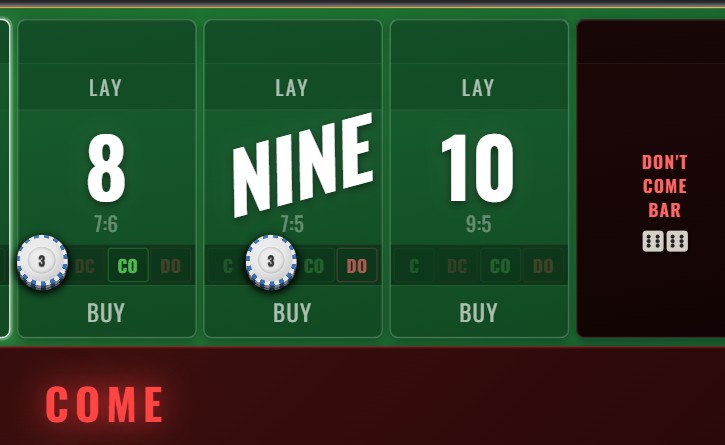
When Come and Don't Come bets travel to a number, you'll see small labels under each point number on the table:
C — A Come bet sitting on this number, waiting for it to hit before a 7.
CO — Come Odds behind that Come bet (pays true odds, zero house edge).
DC — A Don't Come bet on this number, waiting for a 7 before the number hits.
DO — Don't Come Odds behind that Don't Come bet.
These labels make it easy to see at a glance which numbers have active Come/Don't Come action, even when the table gets crowded with bets.
Place Bets
Bet on a specific number (4, 5, 6, 8, 9, or 10). If that number is rolled before a 7, you win. Unlike line bets, Place bets can be taken down at any time.
| Number | Place Payout | House Edge |
|---|---|---|
| 4 or 10 | 9 to 5 | 6.67% |
| 5 or 9 | 7 to 5 | 4.00% |
| 6 or 8 | 7 to 6 | 1.52% |
Buy Bets
Like Place bets but pay at true odds with a 5% commission on winnings. Better value on 4 and 10 where the Place payout discount is steepest. Not available in Easy variant.
| Number | Buy Payout | House Edge |
|---|---|---|
| 4 or 10 | 2 to 1 (minus 5% vig) | 4.76% |
| 5 or 9 | 3 to 2 (minus 5% vig) | 4.76% |
| 6 or 8 | 6 to 5 (minus 5% vig) | 4.76% |
Lay Bets
Bet that a 7 will come before a specific number. You're essentially playing the "don't" side for a single number. You lay more to win less, with a 5% commission on winnings. Not available in Crapless or Easy variants.
Lay bets are mutually exclusive with Buy/Place bets on the same number — you can't bet both for and against the same point.
Field Bet
A single-roll bet. Wins if the next roll is 2, 3, 4, 9, 10, 11, or 12. Loses on 5, 6, 7, or 8.
Special payouts: A 2 always pays double (2:1). A 12 pays double or triple depending on your table configuration (set in the setup screen). All other Field wins pay even money.
Hardway Bets
A Hardway bet wins when a specific total is rolled as doubles. It loses when that total is rolled the "easy way" (two different dice) or when a 7 is rolled. Hardways stay active until they win or lose.
| Bet | Wins On | Loses On | Payout | House Edge |
|---|---|---|---|---|
| Hard 4 | 2+2 | Any 7, or 1+3 / 3+1 | 7 to 1 | 11.11% |
| Hard 6 | 3+3 | Any 7, or easy 6 | 9 to 1 | 9.09% |
| Hard 8 | 4+4 | Any 7, or easy 8 | 9 to 1 | 9.09% |
| Hard 10 | 5+5 | Any 7, or 4+6 / 6+4 | 7 to 1 | 11.11% |
Proposition Bets (Single-Roll)
These bets resolve on the very next roll — win or lose, they're done. High payouts, high house edge.
| Bet | Wins On | Payout | House Edge |
|---|---|---|---|
| Any 7 | Total of 7 | 4 to 1 | 16.67% |
| Any Craps | 2, 3, or 12 | 7 to 1 | 11.11% |
| Aces (Snake Eyes) | 1+1 | 30 to 1 | 13.89% |
| Ace-Deuce | Total of 3 | 15 to 1 | 11.11% |
| Yo (Eleven) | Total of 11 | 15 to 1 | 11.11% |
| Boxcars (Midnight) | 6+6 | 30 to 1 | 13.89% |
Multi-Proposition Bets
These are combination bets that split your wager across multiple propositions in a single bet:
Horn — A four-way split on 2, 3, 11, and 12. If any of those numbers roll, you win the corresponding prop payout on one quarter of your bet (minus the three losing quarters). Pays 30:1 on 2/12, 15:1 on 3/11.
C&E (Craps & Eleven) — A two-way split on Any Craps and Yo. Pays 7:1 on any craps number, 15:1 on eleven.
Whirl (World) — A five-way split on 2, 3, 7, 11, and 12. Like the Horn but adds Any 7. If 7 rolls, the Any 7 portion wins but the Horn portions lose — typically a push.
Hop Bets
The most specific bet in craps — you're betting on the exact dice combination of the very next roll. Want to bet that the next roll will be specifically a 3 and a 5? That's a hop bet.
All 21 possible combinations are available in Craps Royale. Easy hops (two different dice, like 3+5) pay 15:1. Hard hops (doubles, like 4+4) pay 30:1. Most real casino craps tables don't even offer hop bets — Craps Royale has all 21.
Other Bets
Big 6 / Big 8 — Wins if 6 (or 8) is rolled before a 7. Pays even money (1:1). This is actually a worse version of Place 6/8 (which pays 7:6) — it exists because it's on real craps tables, even though experienced players avoid it.
Big / Small — Multi-roll bets available in Standard variant only. Big wins if any total from 8 through 12 is rolled before a 7. Small wins on 2 through 6 before a 7.
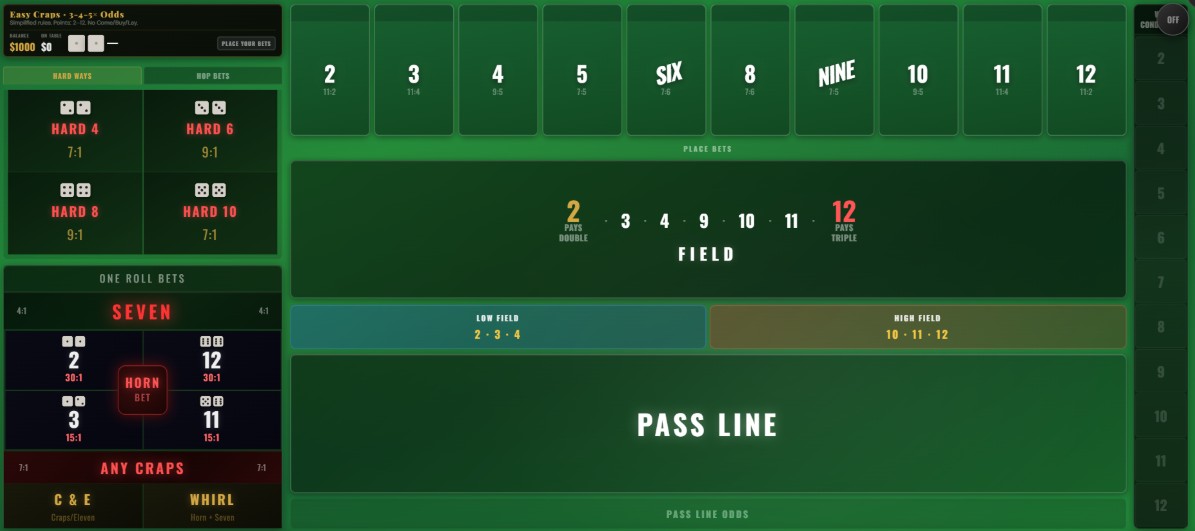
Low Field / High Field — Easy Craps exclusive bets. Low Field wins on 2, 3, or 4 (pays 2:1). High Field wins on 10, 11, or 12 (pays 2:1). These replace some of the bets that aren't available in Easy mode.
7. Game Variants
Standard Craps
Classic Las Vegas rules. Point numbers: 4, 5, 6, 8, 9, 10. Come-out wins on 7 or 11, craps on 2, 3, 12. All 42+ bet types available, including Don't Pass, Lay bets, Big/Small, and the full proposition menu. This is the game you'd find at any Las Vegas strip casino.
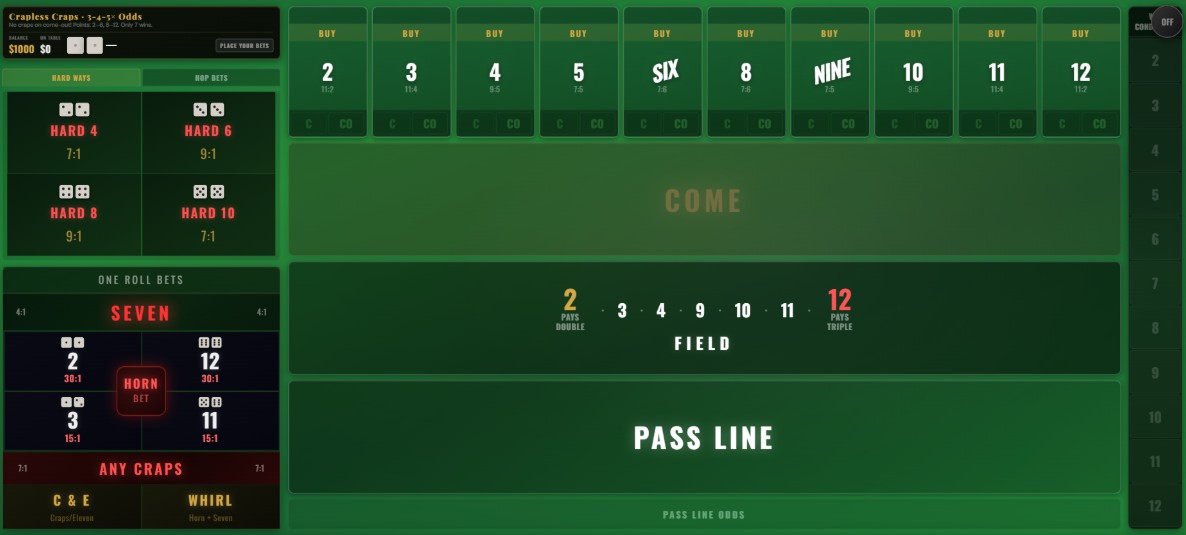
Crapless Craps
You can't crap out on the come-out roll. Every number except 7 becomes a point — including 2, 3, 11, and 12. Only 7 wins on come-out. The catch: points like 2 and 12 have only 1 way to be made versus 6 ways to roll a 7, making them extremely difficult to hit.
Not available: Don't Pass, Don't Come, Don't Come Odds, Lay bets, Big 6/8, Big/Small.
Easy Craps
Simplified rules designed for learning. Like Crapless, every number except 7 becomes a point on come-out. But with a reduced bet menu — no Come/Don't Come travel system, no Buy/Lay bets. Adds exclusive Low Field and High Field bets.
Not available: Don't Pass, Come, Don't Come, Buy bets, Lay bets, Big 6/8, Big/Small.
8. Table Configuration
The setup screen lets you fine-tune the table rules. You can pick a preset that configures everything at once, or adjust individual settings.
Table Presets
| Preset | Odds | Field 12 | Min Bet | Max Bet | Balance |
|---|---|---|---|---|---|
| Low-Limit | 2× | Double | $5 | $500 | $1,000 |
| Standard Casino | 3-4-5× | Double | $10 | $5,000 | $5,000 |
| High-Limit | 10× | Triple | $25 | $10,000 | $25,000 |
| Player-Friendly | 10× | Triple | $5 | $5,000 | $5,000 |
Each preset also has a description explaining who it's for. You can customize any value after selecting a preset — it's just a starting point.
Odds Mode
2× — Bet up to 2× your line bet in odds. Low risk, common on budget tables.
3-4-5× — Up to 3× on 4/10, 4× on 5/9, 5× on 6/8. The most common odds mode in Las Vegas. Designed so that the maximum odds payout is always 6× the original line bet.
10× — Up to 10× your line bet in odds. High-roller tables. Massive swings, but since odds pay at true odds (zero house edge), more odds = lower overall house advantage.
Field 12 Payout
2:1 (Double) — Field 12 pays double, same as Field 2. Higher house edge on the Field bet. This is the most common setting in real casinos.
3:1 (Triple) — Field 12 pays triple. Significantly reduces the Field bet's house edge. Found at player-friendly tables.
Payout Rounding
When a bet pays a fraction (like a $1 Place bet on 4, which pays 9:5 = $1.80), the game needs a rule for how to handle the cents:
Round Down — House keeps the fraction. Most realistic — this is how physical casino tables work. A $1.80 payout becomes $1.
Nearest — Round to the nearest cent. Balanced approach, closer to true mathematical odds.
Pay Exact — No rounding at all, pays exact decimal amounts. This is how electronic Bubble Craps machines work in casinos. Most player-friendly.
9. The Dice Lab
The Dice Lab is what makes Craps Royale a simulator, not just a game. It gives you direct control over the dice — something no real casino would ever allow. Use it to test strategies, study probability, or just see what happens when you push the math to its limits.
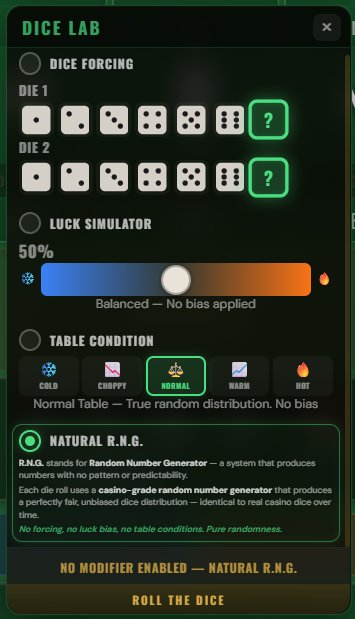
Dice Forcing
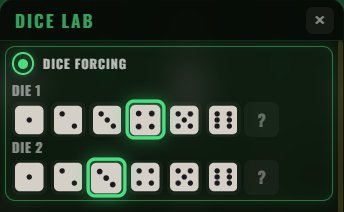
Select an exact value for Die 1, Die 2, or both. Each die has a grid showing faces 1 through 6, plus a "?" option that leaves that die random. Tap a face to lock that die to that value; tap again to unlock it.
This is the most direct tool in the Dice Lab. You're telling the simulator exactly what to roll.
Luck Simulator
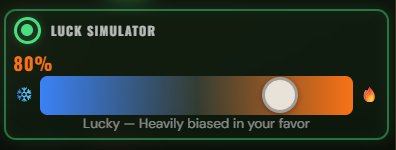
A slider from 0% to 100% that biases the dice based on your active bets. The system looks at what bets you have on the table and tilts the outcome accordingly.
0% (Unlucky) — The system actively picks results that lose your bets. If every possible result wins at least one of your bets, it picks the one that wins the least.
50% (Default) — No bias at all. Pure natural random odds. The label reads "Balanced — No bias applied."
100% (Lucky) — The system always picks a result that wins at least one of your active bets. You become the luckiest player who ever lived.
Values between these extremes blend between bias and randomness. At 70%, you'll win more often than natural odds would predict, but not every time.
Table Conditions
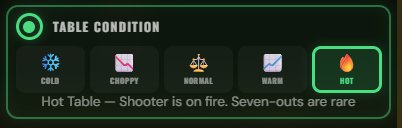
Every craps player has experienced "hot" and "cold" tables — streaks where the 7 seems to disappear or appear on every other roll. Table Conditions lets you manufacture those streaks so you can study their actual impact on your bankroll.
| Condition | What It Does |
|---|---|
| Cold ❄️ | The 7 dominates — appears on nearly half of all rolls. Points almost never hit. Place bets get swept constantly. A nightmare scenario for right-side bettors. |
| Choppy 🎲 | Unpredictable — results alternate between wins and losses in a back-and-forth pattern. No momentum builds in either direction. |
| Normal ⚖️ | True random distribution, no bias. Same as having Table Conditions turned off. |
| Warm 🔥 | The 7 is less frequent than normal. Points hit more often. Place bets and Hardways survive longer. A good night at the table. |
| Hot 🔥🔥 | The 7 almost never shows up. Shooters hold the dice for incredibly long rolls. Points get made easily. The kind of table you tell stories about. |
Natural R.N.G. (Casino Random)
The fourth and default option. All simulation tools are off — the dice are completely fair and unbiased. This is the mode you play in when you want the real casino experience.
The random number generator in Craps Royale produces a perfectly fair, unbiased dice distribution that matches real casino dice over time. Every one of the 36 possible dice combinations (1+1 through 6+6) has an exactly equal probability of appearing on each roll. There is no memory between rolls, no patterns, and no hidden bias. Over thousands of rolls, you'll see the exact same distribution of results you'd see at a physical craps table — the 7 appearing roughly once every 6 rolls, the 6 and 8 appearing 5 times out of 36, and so on.
When Natural R.N.G. is active, the Roll button shows its normal label with no "SIM MODE" indicator.
10. Tooltips & Win Conditions
Craps Royale includes built-in educational tools that help you understand every bet and every possible outcome without leaving the table.
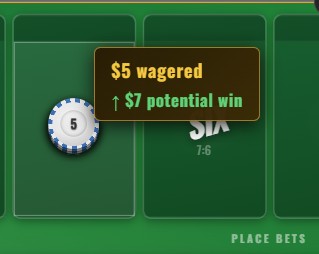
Bet Tooltips
Hover over any bet zone (or long-press on mobile) to see a detailed tooltip explaining:
Bet name and rules — What the bet is and how it wins or loses.
Payout ratio — The exact payout for this bet.
Current wager — How much you have on this zone.
Potential win — How much you'd receive if this bet wins right now.
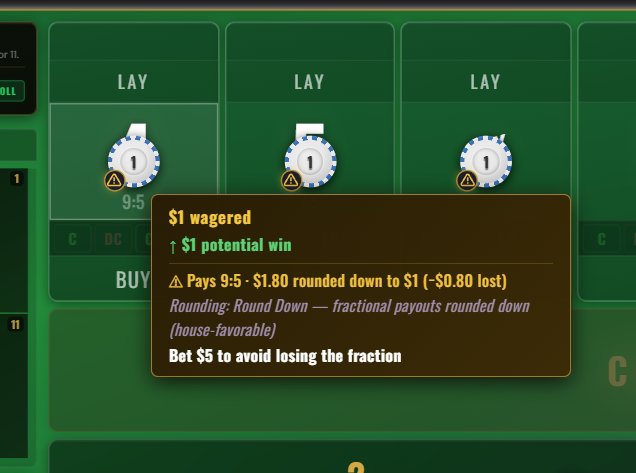
Fraction warning — When a bet would produce a fractional payout, the tooltip shows a ⚠ warning icon with the exact rounding impact and suggests a better bet amount.
Understanding Fraction Warnings
Many craps bets have payouts that don't divide evenly at all wager amounts. For example, Place 4 pays 9:5 — if you bet $1, you should win $1.80. But $1.80 isn't a whole chip. What happens to that $0.80?
It depends on the Payout Rounding setting you chose in the setup screen:
Round Down — The house keeps the fraction. A $1.80 payout becomes $1. You lose $0.80 to rounding. This is how real casino tables work — they can't pay $0.80 in physical chips.
Nearest — The payout is rounded to the nearest cent. $1.80 stays $1.80 (or rounds to $2 at the dollar level). More fair than Round Down.
Pay Exact — No rounding at all. You get $1.80. This is how electronic Bubble Craps machines work. Most player-friendly.
The ⚠ warning icon only appears when you're using Round Down mode and your bet amount would cause you to lose money to rounding. The tooltip shows:
• The exact payout ratio (e.g., "Pays 9:5")
• The raw payout before rounding (e.g., "$1.80")
• The actual payout after rounding down (e.g., "$1.00")
• How much you lose to rounding (e.g., "−$0.80 lost")
• A suggestion: "Bet $5 to avoid losing the fraction" — because $5 × 9/5 = $9 exactly, no rounding needed.
Win Conditions Column

On the right side of the table, a vertical column shows all possible dice totals (2 through 12). The current point number is highlighted. Tap any number to see a detailed breakdown of what would happen if that exact number were rolled with your current bets.
"What Rolling X Means" Popup
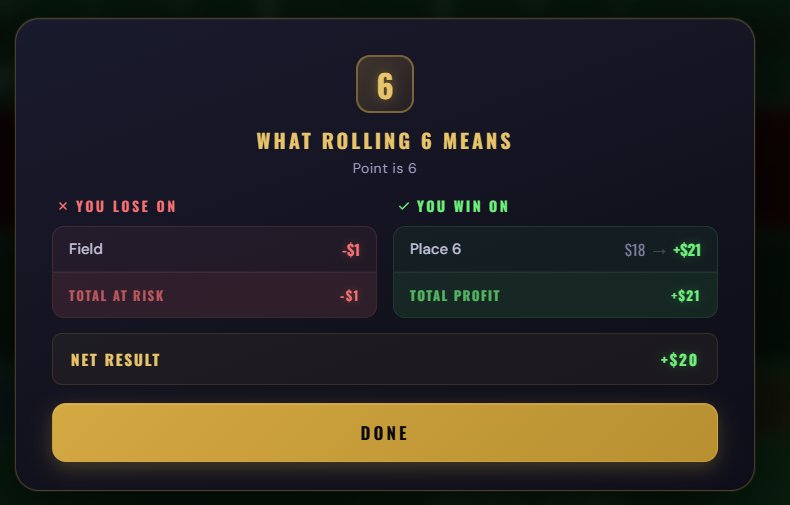
This popup shows a complete breakdown for any given total:
YOU LOSE ON — Lists every active bet that would lose if this number is rolled, with the amount at risk.
YOU WIN ON — Lists every bet that would win, showing both the wager and the payout amount.
NET RESULT — The total profit or loss if this number is rolled right now.
11. Session Log & CSV Export
Every roll is automatically recorded with full context: what bets were active, which won or lost, the exact profit or loss, your balance, and which Dice Lab mode (if any) was active. This data is designed for post-session analysis in a spreadsheet.
Exporting
Tap "Export CSV" in the Settings panel or in the Statistics panel to download your session as a CSV file. The file opens in Excel, Google Sheets, or any spreadsheet tool. The export works identically on desktop (browser or Steam app) and mobile.
What's in the CSV
| Column | Description |
|---|---|
| Roll# | Sequential roll number (1, 2, 3...) |
| Time | Seconds elapsed since session start — useful for pacing analysis |
| Type | "roll" for dice rolls, "event" for context changes (variant switch, app reopen, etc.) |
| Variant | Which game variant was active for this roll (standard, crapless, easy) |
| Phase | comeOut or point |
| Point | The active point number, or blank during come-out |
| D1, D2, Total | Individual dice values and their sum |
| Sim_Mode | Which Dice Lab tool was active: "none", "luck:80%", "forced:4+4", "table:hot", or combinations |
| Bets_Active | All bets on the table with their wager amounts |
| Bets_Won | Which bets won on this roll, with their wager amounts |
| Bets_Lost | Which bets lost on this roll, with their wager amounts |
| Bets_Pushed | Which bets pushed (tied), with amounts — e.g., Don't Pass bar 12 |
| Roll_PnL | Net profit or loss for this specific roll (positive = won, negative = lost) |
| Payout | Total money returned to you on this roll (includes stake returns for wins) |
| Balance | Your balance after this roll resolved |
| Notes | Description text for event rows; blank for normal rolls |
Event Rows
The log doesn't just record rolls — it also records context changes as special "event" rows. When you change variants mid-session, reopen the app after closing it, or reset your balance, an event row is inserted with a note explaining what happened. This means you'll never see unexplained jumps in the data.
Managing the Log
Toggle recording on or off from Settings (when off, no data is collected — zero overhead). Clear the log at any time to start fresh from both the Settings or the Statistics panel. The buffer holds up to 5,000 rolls — when the limit is reached, the oldest entries are automatically removed to make room. Your log survives closing and reopening the game.
12. Statistics Dashboard
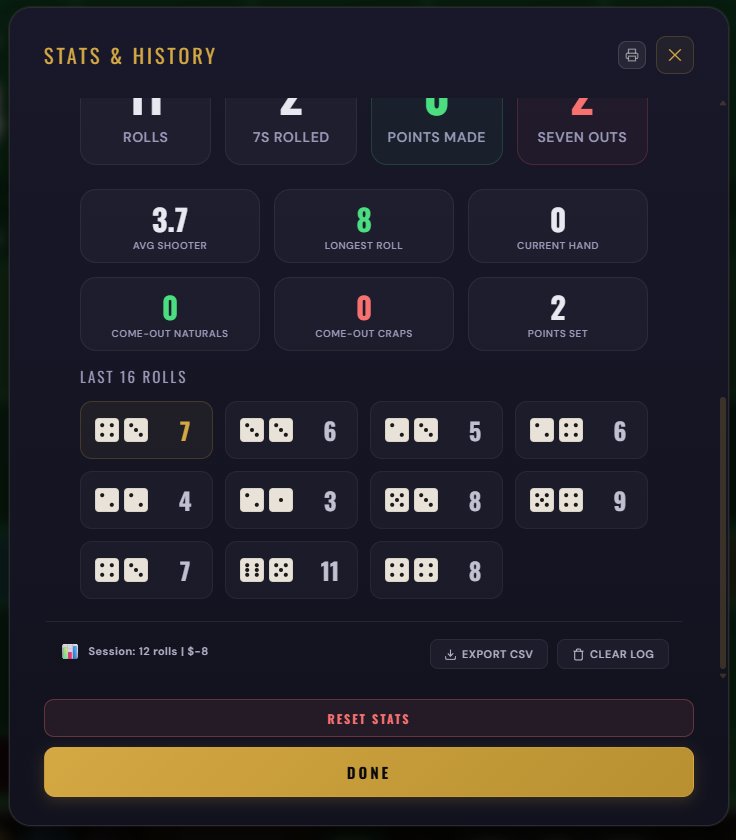
Tap the Stats button to see your complete session statistics.
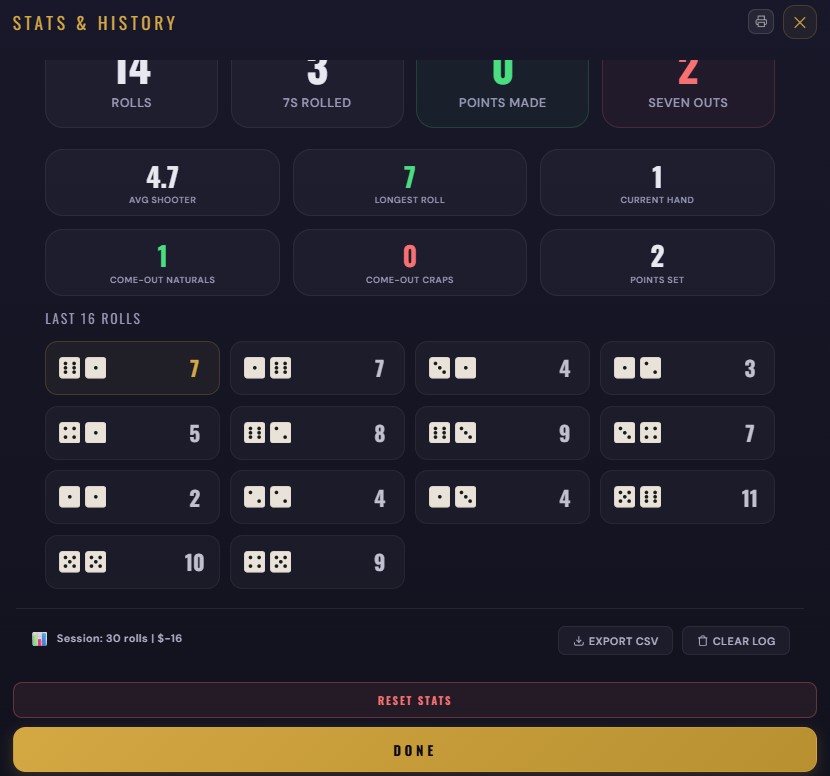
Roll Statistics
The dashboard tracks ten key metrics across your session:
| Stat | What It Measures |
|---|---|
| Rolls | Total dice rolls this session |
| 7s Rolled | How many times a 7 has appeared |
| Points Made | How many times the point was hit before a 7 |
| Seven Outs | How many times a 7 ended the point phase |
| Avg Shooter | Average number of rolls per shooter (point phase length) |
| Longest Roll | The longest single shooter run this session |
| Current Hand | How many rolls the current shooter has made |
| Come-Out Naturals | 7s and 11s rolled during come-out (Pass Line instant wins) |
| Come-Out Craps | 2s, 3s, and 12s rolled during come-out (Pass Line instant losses) |
| Points Set | How many times a point was established on come-out |
Last 16 Rolls
A visual grid showing the last 16 dice results with individual die faces and totals. The most recent roll is highlighted. This gives you a quick read on what the table has been doing — are 7s clustering? Are the same numbers repeating?
Session Export & Controls
At the bottom of the Statistics panel you'll find:
Session summary — Your roll count and net profit/loss for the session.
Export CSV — Download the session log (same function as in Settings).
Clear Log — Delete all recorded rolls and start the log fresh.
Reset Stats — Zero out all the statistical counters above. This resets the counters only — it does not affect your balance or bets.
13. Settings
About
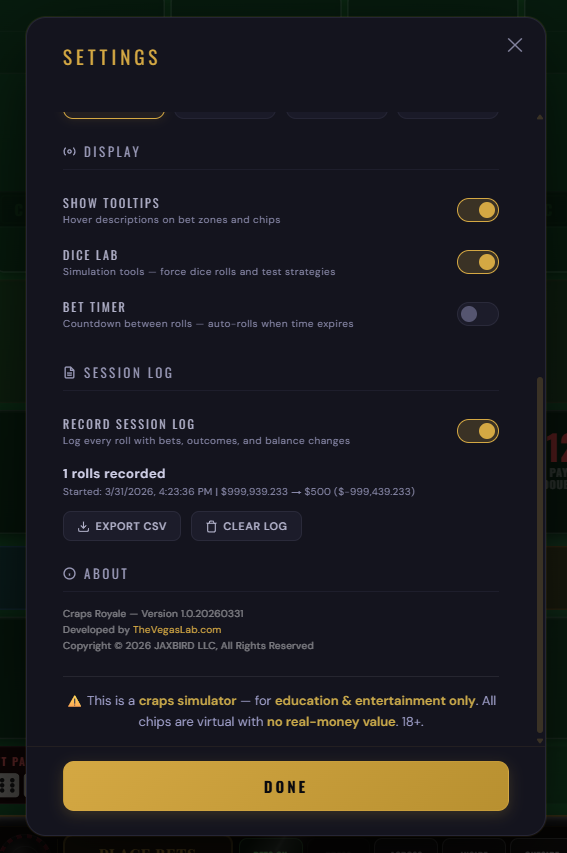
Shows the game version, developer (TheVegasLab.com), and copyright (JAXBIRD LLC).
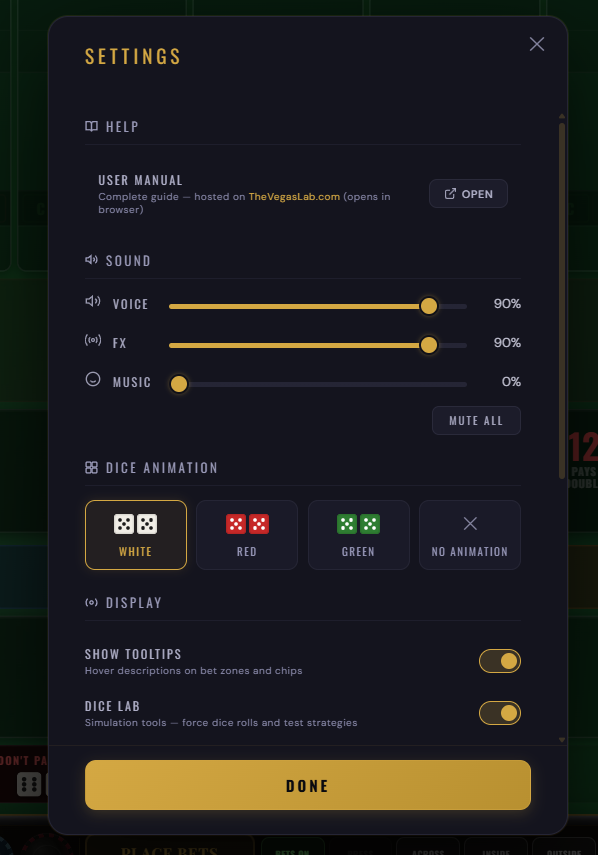
Audio
Voice — Controls the stickman announcer volume. The stickman calls out dice results just like in a real casino: "Yo eleven!", "Snake eyes!", "Seven out, line away!", "Winner winner!" and more. This adds atmosphere and helps new players learn the traditional calls.
FX — Controls chip sounds, dice rolling sounds, and win celebration effects.
Music — Controls the background music volume. The ambient soundtrack plays during gameplay and can be adjusted independently.
All three have independent sliders so you can fine-tune the mix. Press M on keyboard to mute/unmute all audio at once.
Dice
Dice Color — Choose the look of your dice: White (classic casino), Red (most traditional), Green (matches the felt), Black, or Gold.
Dice Shooter — Toggle the 3D dice shooting animation on or off. When enabled, dice fly across the table and bounce off the wall before settling. When disabled, dice results appear as flat faces — faster for rapid play or data collection sessions.
Display
Show Tooltips — Toggle the hover/long-press descriptions on bet zones and chips. Turn them off once you know the game by heart.
Dice Lab — Enable or disable the Dice Lab simulation tools. When disabled, the Dice Lab button disappears from the table and all simulation tools are turned off.
Pinch to Zoom (mobile only) — Enable two-finger pinch-to-zoom and drag-to-pan on the table. Disabled by default to prevent accidental zooming. When enabled, double-tap anywhere to reset the zoom. See Section 2: Platform Availability for details.
Bet Timer
Timer — Enable a countdown timer that auto-rolls the dice after a set duration. Choose Off, 10s, 20s, or 30s. This simulates the pacing of a Bubble Craps machine or a live table with a clock.
When the countdown reaches the final second, a "No More Bets" announcement plays, all bet zones lock briefly, and the dice roll automatically. The timer pauses while any modal (Settings, Stats, Exit) is open and resumes when the modal closes.
The timer can also be configured from the setup screen before entering the table.
Session Log
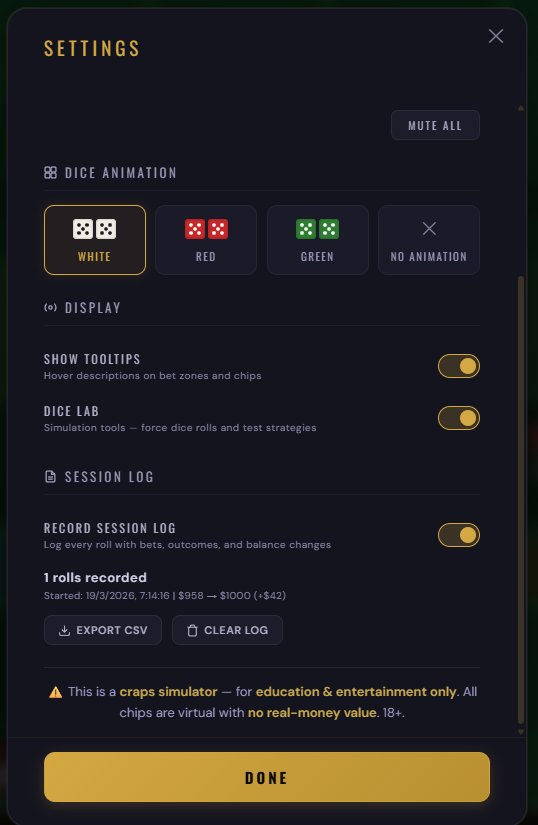
Record Session Log — Toggle recording on or off. When enabled, every roll is captured with full context. When disabled, no data is recorded (zero performance impact).
Below the toggle, you'll see the current roll count, session start time, and your balance change since the session started. Three buttons let you Print the session log, Export CSV, or Clear Log directly from Settings.
14. Keyboard Shortcuts & Gestures
Craps Royale supports keyboard shortcuts on all platforms — desktop browsers, Steam, the Windows app, and even mobile devices with a Bluetooth keyboard connected.
Keyboard Shortcuts
| Key | Action | Notes |
|---|---|---|
Space or Enter | Roll the dice | Only during betting phase with bets on the table |
Ctrl+Z | Undo last bet | Same as the Undo button — reverts the last chip placed |
Escape | Close panel / popup | Closes whichever overlay is on top: Settings, Stats, Exit modal, or Dice Lab |
D | Toggle Dice Lab | Opens or closes the Dice Lab window (must be enabled in Settings) |
S | Toggle Stats | Opens or closes the Statistics Dashboard |
M | Mute / Unmute | Toggles all sound on or off — a toast confirms the change |
Mouse Controls (Desktop)
| Action | Effect |
|---|---|
| Click bet zone | Place one chip of the selected denomination |
| Shift + Click bet zone | Double the existing bet on that zone |
| Right-click bet zone | Remove one chip from that zone |
| Shift + Right-click bet zone | Remove all chips from that zone at once |
| Hover over bet zone or chip | Show tooltip with payout, odds, and house edge |
Touch Gestures (Mobile)
| Gesture | Effect |
|---|---|
| Tap bet zone | Place one chip of the selected denomination |
| Long-press bet zone | Remove one chip (same as right-click on desktop) |
| Long-press on hover zone | Show tooltip with bet details |
| Pinch (two fingers) | Zoom in/out on the table (must be enabled in Settings) |
| Drag (while zoomed) | Pan around the table |
| Double-tap | Reset zoom to full table view |
15. Steam Achievements
Craps Royale has 16 achievements to unlock. Some come naturally just by playing, others require dedication or specific situations. Two are hidden — you won't know what they are until you unlock them.
| Achievement | How to Unlock |
|---|---|
| 💯 100 Rolls | Roll the dice 100 times |
| 🎯 1,000 Rolls | Roll the dice 1,000 times |
| 👑 10,000 Rolls | Roll the dice 10,000 times |
| 🏆 10 Points Made | Successfully make 10 points (hit the point before a 7) |
| 📊 Odds Bet Placed | Place your first odds bet behind a line bet |
| 🌍 All Variants | Play all three game variants (Standard, Crapless, Easy) |
| 🎰 All 42 Bets | Place at least one bet in all 42 different bet zones |
| 🚀 Hop Win | Win a hop bet |
| 💎 Field 12 | Win a Field bet when 12 is rolled |
| 🐍 Snake Eyes | Roll double ones (1+1) |
| 🎲 Boxcars | Roll double sixes (6+6) |
| 💪 All Hardways | Hit all four Hardway bets (Hard 4, 6, 8, 10) in a single session |
| 🔥 Hot Streak | Make 5 consecutive points without a seven-out |
| 7️⃣ Five Sevens | Roll a 7 five times in a row |
| 🌙 Hidden | ??? |
| 🗣️ Hidden | ??? |
16. Tips for New Players
17. Glossary
| Term | Definition |
|---|---|
| Across | Placing bets on all point numbers (4, 5, 6, 8, 9, 10) except the current point. |
| Bet Timer | A countdown clock that auto-rolls the dice after a set duration. Simulates the pacing of a Bubble Craps machine. |
| Boxcars | Rolling 6-6 (total 12). Also called "midnight." |
| Bubble Craps | An electronic craps machine found in many casinos. Uses a bet timer and typically offers exact payouts. Craps Royale includes a Bubble Craps preset. |
| Come-out roll | The first roll of a new round, before a point is established. |
| Contract bet | A bet that cannot be removed once a point is set. Pass Line and Come are contract bets. |
| Craps | Rolling 2, 3, or 12 on the come-out roll. Pass Line loses immediately. |
| Dice Shooter | The 3D dice animation where dice fly across the table and bounce off the wall. Can be toggled on/off in Settings. |
| Don't side | Betting against the shooter (Don't Pass, Don't Come). Also "wrong side" or "dark side." |
| Easy way | Rolling a total with two different dice (e.g., 2+4 = easy 6). |
| Hard way | Rolling a total as doubles (e.g., 3+3 = hard 6). |
| Hop bet | A single-roll bet on a specific dice combination (e.g., 3+5). |
| House edge | The casino's mathematical advantage on a bet, expressed as a percentage. Lower is better for the player. |
| Inside | The numbers 5, 6, 8, 9 — the four point numbers closest to 7. |
| Iron cross | Strategy: Field + Place 5, 6, and 8. Covers every number except 7. |
| Natural | Rolling 7 or 11 on the come-out roll. Pass Line wins immediately. |
| Odds bet | An additional bet behind a line bet that pays at true odds (zero house edge). The best bet in the casino. |
| Off | A bet temporarily not working. Place bets default to "off" during come-out. |
| Outside | The numbers 4, 5, 9, 10 — the four point numbers farthest from 7. |
| Point | A number (4, 5, 6, 8, 9, or 10) established on come-out. Must be rolled again before a 7 to win. |
| Press | Doubling a winning Place bet by adding the winnings back onto the bet. |
| Puck | The ON/OFF marker on the table showing the game phase and the point number. |
| Push | A tie — bet is returned with no profit or loss. Don't Pass on come-out 12 is a push. |
| Seven out | Rolling a 7 during the point phase. Pass Line and all point-dependent bets lose. |
| Snake eyes | Rolling 1-1 (total 2). Also called "aces." |
| Stickman | The casino employee who calls dice results. Craps Royale includes an authentic voice announcer. |
| True odds | The actual mathematical probability of an outcome. Odds bets pay at true odds, giving the house zero edge. |
| Vig (vigorish) | Commission charged on Buy and Lay bets. Usually 5% of winnings. |
| Working | A bet that is active and will resolve on the next roll. |
| Yo | Eleven. Called "yo" (or "yo-leven") at the craps table to avoid confusion with "seven." |
This is a craps simulator for education and entertainment. No real money gambling. All chips are virtual. 18+.
Craps Royale — The Ultimate Craps Simulator
© 2026 JAXBIRD LLC. All Rights Reserved.
Developed by TheVegasLab.com